Posts

How To Get Page Descriptions / Meta Tags in Google Sites Created in Apps
Image
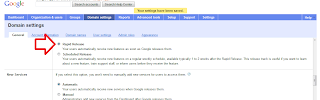
Happy Monday all! Ok, do not fret you can get meta tags in google sites created in Apps, however you may not see the page descriptions box when you click on more > page settings. If this is the case then you need to log into your apps account and make a simple chanage. Go to google.com/apps and log into your apps account in 'domin management' mode. Click on domain settings, the click the radar button readinig Rapid release. All you are doing is giving google the green light to add features rapidly as they shoot along. Now you have the box at your disposal enjoy labelling all those pesky pages won't you ... B x www.siteshelp.co.uk
Dictionary Definition - Meta Tags

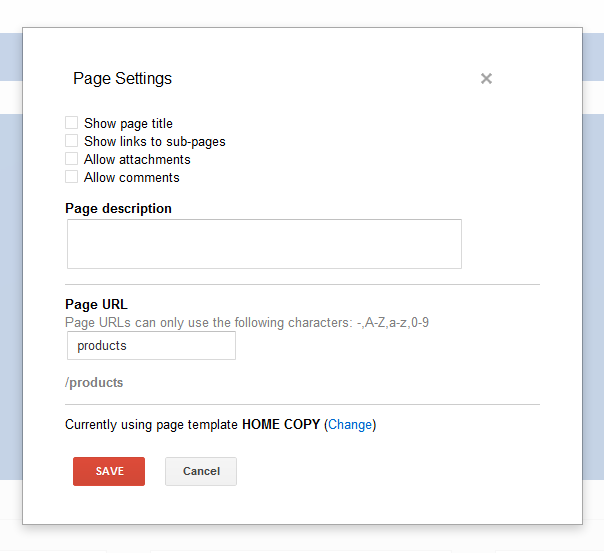
Happy Friday all! To add to Kyle's great and informative post about meta tags I thought I would share with you my theory about adding  page descriptions via the "Page Settings" dialog. All you need to make note of the dictionary's description of a meta tag, otherwise you will just be dding mindless keywords which, quite frankly, will look and sound like a big fat spam sandwich. met·a·tag noun Computers .   a tag in HTML that is inserted at the top of a Web page chiefly to describe its content and provide keywords for use by search engines. So, take heed, take time and describe your pages content, but briefly. It really helps if the content of your page is original in the first place, then naturally your meta tag will be more meaningful and visible in searches. Content is king in SEO and meta tags are often used in search snippets too (aka search results text). This is a great feature and is something or...

New Page Descriptions Improve SEO for Google Sites

Image
Introduction So, I was in page settings (under MORE), doing my thing - hiding links to subpages, attachments, and comments - and I saw a page description field. This is brand new! Let's look deeper on this small, but important update! Page Description - Believe it or not, that wasn't there before. I promise. Effect For most, this will have a positive impact on public facing websites SEO. Now you can specifically create the meta data for pages. Let's map out an example. You are an attorney who focuses on three different areas of practice: family law, criminal law, and estate law. The Site Description creates a blanket description for your website, so you might describe that you are a lawyer in Anytown, USA. Now let's imagine you have a page under Services called Family Law. Page title is very important, but it's good to follow that up with a good description explain that you handle Divorce and Child Custody. This page information will be factored in to ...

iGoogle's Retiring - How it affects Gadgets for Sites

Image
Summary Since iGoogle is retiring fully in 2013, the Google Gadget editor will be effected. Referred to as the Google Gadget Gallery in Google Sites, this gallery of published gadgets will go away. The functionality of xml gadgets will be constant though, so prepare your websites. Quoted from Google: As we announced on the Official Google Blog , on November 1, 2013, we will be retiring iGoogle. To ensure a smooth transition for your users, you may want to update your gadgets and direct users to your site or offer the ability to export user data. You may also consider launching your application on one of our other platforms . Similarly, we will stop accepting new gadgets after July 31, 2012 - but you will be able to update and maintain existing gadgets, as before. What to do Take the initiative to host your gadgets (look for the .xml file) on your own Google Site. You can upload them anywhere on your site and use the "Add Gadget by URL" feature. ...

Favorite Free Font - Ashbury Light

Image
A beautiful serif font free on MyFonts.com, but get it for free! It's always great to have a classy font in your arsenal. Just gives you the feeling that a classic font can convey modernity in the right setting. Click here to visit and download.

Google Sites and Cloudbakers (Part 2)

Why did you need/want a Google Sites consultant? What’s it been like working with Kirksville Web Design? We wanted a Google Sites consultant/partner to increase our knowledge expertise and efficiency. Kyle is 100% focused on Google Sites. Since partnering with Kyle the Great we have been able to bounce ideas off of each other and come up with creative solutions and designs for Sites. Simply put, partnering with Kirksville Web Design and working with Kyle has been awesome and beneficial for our clients. We’ve had a couple of great projects together, what were those like from your perspective? Yes we have! What always amazes me about you is the efficiency at which you work. We have actually had clients say they were happy and surprised with the amount of time it took. Your visual creativity for sites adds alot of value, it’s always important for sites to have good content, but the display is also important and contributes to the engagement of users. Our working relationship is exc...

Google Sites and Cloudbakers (Part 1)

Image
Introduction Building solid partnerships with Google Apps Resellers is an important aspect of being a freelancer, consultant, and/or the graphic designer. Just think, Google Apps Resellers are charged with providing cloud computing solutions and that alone has them involved in all sorts of supplementary services. My company, Kirksville Web Design , has had the pleasure of partnering with Google Apps Reseller, Cloudbakers , for Google Sites design and development services. For the most part, we provide the graphics and Sites know-how, while Cloudbakers consults with clients and provides Google Apps Script support. My point of contact over the past months has been Andrew Johnston. We chat all the time and so when I asked him for an interview, he was delighted. A Great Google Apps Reseller in Chicago, IL, US Andrew, tell us a bit about Cloudbakers and yourself. I am the Manager of Business Development for Cloudbakers , a Chicago-based Google Apps Premier SMB Reseller. Working ...

Launching AppsResellers.net

Image
Here at Kirksville Web Design  we are proud to announce the launch of our newest website and this one is close to our heart. =) AppsResellers.net is dedicated to easily showing people how to find a Google Apps Authorized Reseller near you. Visitors can use the handy Google Map tool to find their location and Google Apps Resellers in their area. We look forward to telling you more about the site, but for now, explore it and enjoy. www.appsresellers.net

Site Search Update & Bug

Image
UPDATE 6/5/2012 9:13am - Steps are being taken to fix the bug as I speak. The search box can now be disabled. If you had it previously disabled before the bug it will revert to that. However, there seems to be some vertical alignment issues to iron out. Horizontal navigation bars are being adversely effected. I'll keep you posted. Intro This is kind of a bug report and update in one. Overall this is a small update, but one that will be very handy for company intranets and schools. I hope to use it soon on Kirksville Web Design intranet projects. Bug Even though you may have Search disabled, it seems to be showing up. You can visit Manage Site > Site Layout > Site Search > the box will be unchecked. This may interfere with graphics that weren't made to take this into account. A small hassle, but still one that needs resolved. Update A new checkbox for search all sites in your Google Apps domain. You are no longer confined to searching within one site f...

RSS Feed with Feedburner's BuzzBoost

Image
Kyle here from Kirksville Web Design . For some reason the Embed RSS Feed featured gadget is broken and we all needed a solution to embedding an RSS feed into our Google Sites. You needed it, we made it. Using Feedburner, a service of Google, you can use this handy XML gadget I created to add a nice looking feed. Simply go through the steps of adding your syndication to Feedburner and click on the "Publicize tab." From there, you'll see BuzzBoost - Republish your RSS Feed as HTML! Activate this service and customize your options. You'll see a code for adding this to your Google Sites webpage. Copy this string of code, your Javascript URL for the feed. (See the highlighted part in the screenshot below. Copy that code and get ready to use it! "But Google Sites doesn't support Javascript" you may say. Google Sites supports Javascript in the confines of a gadget. So, here's your gadget. Styled and everything, located at: https://si...

Scheduled Google Hangout

Image
Join me for a Google + Hangout today at 11am PST all about Google Apps. Here's a link to my profile: https://plus.google.com/u/0/111511601440949402611

Go Google Sites with Kirksville Web Design

Image
In honor of gogooglesites.kirksvillewebdesign.com going live earlier today, here is a free rendering of the Google Sites icon. Promote Google Sites with this nice icon. Visit the new website Let's take a look at the new site! Make it easy for people to share your website.  Use the +1 button in Insert... and the Tweet button from Insert > More Gadgets... > Featured What's that ??? Create the visual tension to learn more What's that icon? I've gone Google, what's his point? Encourage the visitor to scroll down.

Survey Available Now

Google Sites is taking user feedback via a survey right now. If you are logged into a Google Site you will see it in the tool bar next to edit page, create page, and more. I've seen it both on standard Google accounts and Google Apps for Business accounts. Take your time and let the Google Docs, that is the Sites team as well, let them know your thoughts. Thanks. It's always great to see Google Sites steered in a good direction from user input.

Working with the HTML Box

Image
Now that the Google Sites HTML box has been out for a while for those without Google Apps, I've had some time to fool around with it. Experiments The HTML box is not the answer to free-reign scripting. You can use more  HTML, CSS, Javascript, and jQuery, but you cannot use all of it. I couldn't embed the Google + gadget (strange errors I couldn't fix kept flagging my code to my unpublishable). I couldn't use my usual slideshow code, which uses jQuery. So I started assuming that nothing would work with the HTML that I really wanted. Free Google Sites Slideshow Code The only thing I've effectively used it for is the sample slideshow from:  http://support.google.com/sites/bin/answer.py?hl=en&answer=2500646  . I nicely customized this slideshow and placed it on this page with its code for all to use. Just copy + paste and insert the image URLs. https://sites.google.com/site/htmlboxtesting/ Click here to go to the HTML box testing page. With a custo...

Favorite Free Font - INTRO by Font Fabric

Image
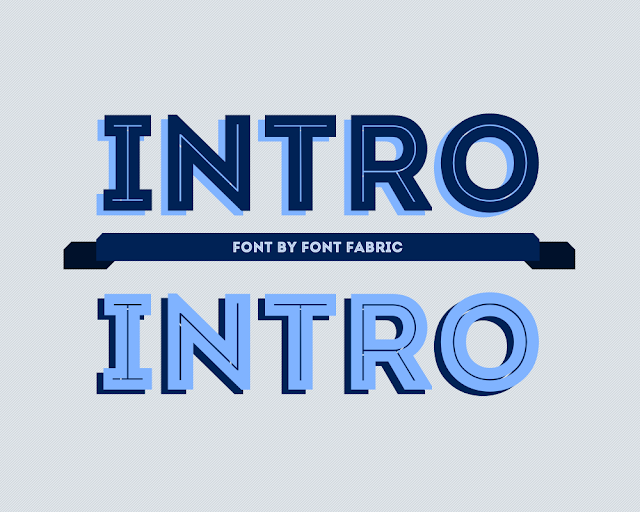
Bold is Beautiful Intro by Font Fabric. Available Here.

Google Sites HTML Box - CSS / Javascript / HTML

Image
Instructions Coming Soon... The newest Google Sites update was a big one because they released the HTML box. Think of this as a haven module for more HTML concepts, CSS, and Javascript, which includes jQuery. We're working on some samples to share soon. Stay tuned. For now, check out this support page from the Google Sites team - http://support.google.com/sites/bin/answer.py?hl=en&answer=2500646

Google Sites New Feature - Mass Upload

Image
Add as many files as you want in one easy step. Free hosting on Google Sites just got better. You can add multiple files at once in the File Cabinet page, in the Add Files at the bottom of pages, in the Attachments. Remember these rules. Click image number 1, hold shift, click image number 20. You've selected images one through twenty. Click image number 1, hold control, click any individual images to add to your selection. Conclusion Google Sites is becoming a popular hub for files and I think we complained enough about having to upload files one-by-one so painstakingly.

Feedback Right in Google Sites

Image
It's wonderful - two new links in the MORE drop down box: one leads you to the Google Sites Help Forum, the other leads you to Google Feedback (my first encounter with this wonderful tool. Check out my experience below. Now you can 'Report an Issue' as soon as it crops up, or just make a suggestion.

Favorite Free Font - Arvil Sans

Image
Avril Sans from the Lost Type Co-Op is an awesome sans-serif / all caps / condensed font that I have recently used a few web design projects here lately. It's beautiful, it's free. I'll keep this post short and sweet because it speaks for itself. This font is a ton of fun. Enjoy the graphic =).

Major Bug Report - Background Image Fixed Position

Image
UPDATE 2/16/2012: This bug has been fixed! Thanks to all that participated on the Google Sites Forum to get this addresses. The Google Sites team resolved this quickly and effectively! The Bug The background image has a fixed position on the page. For instance, when you scroll down the page, the background image occupies the same space regardless of where you've scrolled. This is breaking most designed Google Sites. The footer is eating my content. Help! The Effect The Google Sites help forums are totally abuzz with complaints, probably fueled by customers/clients pestering their web designers. This is a huge problem that came out of nowhere and has many designer caught off-guard. It has been escalated to Google representatives. This isn't good...at all. Conclusion The whole issue calls into question the Google Sites team's beta-testing of updates and truthfully whether they test at all. This problem is readily visible and annoying. On the other h...

Google SItes Directory

Image
Add Your Site - It's FREE! Happy Friday! Beckystar here .... I put together a little treat for you ... sorry it's not chocolate but it is a google sites directory, soon to be the biggest online. Check it out  here ! There are simply some excellent google sites out there so it's a great tool to get some design inspiration and gadget ideas from. Let me know what you think. Whilst you are here .... Don't forget whilst you are here add your google site to the directory and get more viewers!

Google Groups and Drawings

Image
Kyle here with Kirksville Web Design and another Google Sites update. The Google Apps teams is always kind enough to announce changes and roll them out slowly. Sometimes you'll stumble upon them randomly and say 'woah didn't know that was there.' Then you question yourself as to maybe it was there all along and you are losing your mind. Anyways, this is another smallish update to Sites (I haven't been too terribly excited since horizontal navigation rolled out 8/19/2010). Google Groups Discussion Forums There have been several occasions where I have recommended the use of Google Groups Discussion Forums. Since the beautification of this tool, it has garnered more recognition. It was always a hassle to direct clients to More Gadgets, so this is convenient. It's still a bit clunky to setup I think. You need to setup the group, grab the url, and throw it in the gadget. You've easily wasted 10 minutes just to get a commenting functionality. To fix th...

Google Sites News - Gadget Cleanup

Image
The News The following features are now available to domains following the Scheduled Release track: Sites: Removal of some categories in the Gadget Directory with ‘Featured’ becoming the default category. For Google Apps, Google Apps for Business, Government and Education. The Google Sites Gadget Gallery got minimized. The Effect So does this have much of an effect on Google Sites? No, not really. In fact, it lumps all Google Sites gadgets into two categories: Public and Featured. Featured gadgets are wonderful and are either made or endorsed by the Google Sites team. Steegle has some great gadgets for example. He is a Google Sites Help Forum top contributor. My only inclination is to say that Google Sites gadgets have drawn some concern for being superfluous, buggy, and unreliable. Not to mention they are ill-categorized. An overhaul of the Google Sites Gadget Gallery is in my wish list. Some rankings and sorting options would be wonderful. Don't you agre...

Awesome Free Font - Blanch

Image
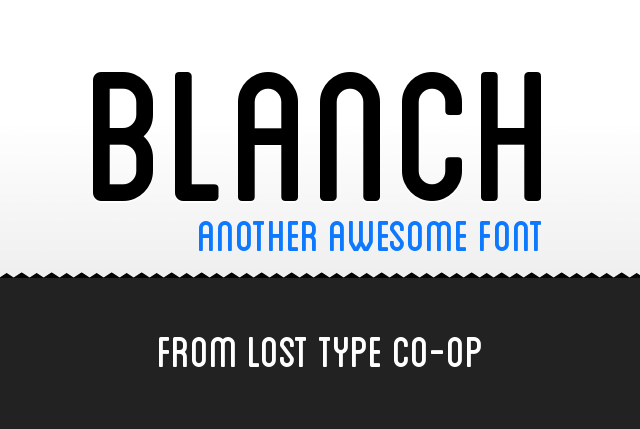
Here is another awesome font from the folks at the Lost Type Co-Op , called Blanch. It's a beautiful, rounded, sans-serif font that I think is really beautiful. Can't wait to use it on our next project here at Kirksville Web Design . Blanch, Our First Highlighted Font of 2012 2011 gave us some great free fonts. Top quality stuff. Keep an eye out for those lovely designers that provide some free goodies.

Backgrounds, Layout, and Call to Action

Image
Intro Here at Kirksville Web Design , we aren't afraid to try new things. New gadgets, backgrounds, layouts, and styles. It great to test the creative mind and think outside the box. Everything in a website has to work in symbiosis, it has to agree. The background image on a Google Site largely dictates the flow of a website, the layout leads your visitor, and the call to action creates conversions (e.g. a product sold, a form filled out, page read). Here's an example of everything working together - synchronicity. Like a Clownfish in the Anemone - Elements need to work together for mutual benefit Background There are two primary background images for the Google Sites Designer: background image wrapper and background image. One usually acts as the header, one as the footer (and doesn't matter much which one is which). The header can be understated or a huge attention grabber. If you are using a slideshow - you want the header to be short in height, because t...