Posts

Top 10 - Wish List for Google Sites in 2013

Image
Hey folks!  +Kyle Horst  here with  +Kirksville Web Design  and I am super excited for 2013 when it comes to Google Sites. 2012 was a successful year for us and I foresee the demand for Google Sites growing. People are migrating to Google Apps in droves and Google Sites enjoys a slice of that success. First, lets review 2012: Easy Edit Site Layout - "Shift + L" That's the hotkey I've been learning quickly for Google Sites because it's quick and easy to edit Site Layout now. No more jostling between different tabs to verify the look and feel. New & Improved Commenting - This feature flies under the radar most of the time, but it's really nice for Wiki type projects. Those comments at the bottom of the page are now easier to follow and track thanks to some Google + type functionality. Now onto our Wish List for 2013: Anyone can comment - I think I speak for every Google Sites enthusiast when I say we want public c...

Bug Report - Slow or Non-existant Google Sites Templates

Image
Intro It looks like the Template Gallery in Google Sites is experiencing some technical difficulties. I got the screenshot below and for the past couple days copying and creating new sites has been difficult. So what's the deal? The Bug It you try to create a new site from a template or copy a site (acts similar to a template) you might not get any options for template to use. If you do see templates, it might take an infinite amount of time for the site to actually create or copy. Solution None at the moment. According to the Google Sites Help Forum, Top Contributors have submitted the issue to the Google Sites team. Potential Cause Every time Google Sites get particularly buggy, there have been updates, upgrades, or changes to the Google Sites application. Could this bug be reasoned that way? Probably. We've long await a better way to manage the Template Gallery, which contains thousands of templates, some spammy, some poor quality, some excellent. It's...

Top 6 Google Webfonts for Google Sites

Image
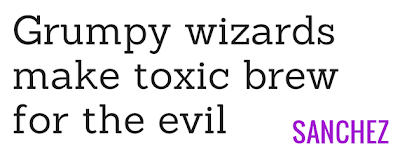
Intro I think everyone knows I love typography. Ever since the Google Sites team released the availability of the hundreds of Google WebFonts I have striven to take advantage of the best fonts around. There are readable fonts, striking fonts, accent fonts and cute fonts. I've cut through to the cream of the crop and found the best fonts suited for Google Sites. So enjoy these top 6 webfonts for Google Sites and implement them on your Google Sites template designs and portfolios. Sanchez This is a newcomer and is trending because of its slab-serif style, reminiscent I think of Museo, which is very popular as well but not a Webfont. Oswald This font is narrow, masculine and bold. I think it is ideal for paragraph headings. Reminds me of Bebas Neue in a way. Remember narrow isn't great for paragraph text. Open Sans It's the poster child font for Google, besides their logo. Clean and crisp, it's a great all-around font that is very legible. Use it...

Google Sites ePortfolios Hangout on Air

Image
Update:  The Hangout is over but I will post the video recording below. It was a lot of fun to create a Google Sites ePortfolio in about an hour. Enjoy! Google Edu Hangout on Air Electronic portfolios offer an authentic way to promote reflection on learning. Discover how to make a Google Sites template to share with your students and have them build their own portfolios. The live event will begin Thursday, November 8, 2pm Eastern at my profile page: https://plus.google.com/116877812762735148703 Kyle from Kirksville Web Design  will be Participating So, if you have any questions related to the design or development side of ePortfolios, I will be weighing in and helping answer questions. I am very happy to help everyone learn about Google Sites and how powerful and fun a platform it can be. Here's a fun graphic I made: Also a Google Hangout Icon for everyone's use: So hop on Google + and join this hangout if you are interested! Thanks all. ...

Kirksville Web Design's Social Media Icon Pack

Image
It can be a difficult task just to find the perfect social media icon set. So made our own Kirksville Web Design Social Media Icon Pack! We created our icons using Inkscape (similar to Adobe Illustrator) and saved all the icons in .svg format. We also provided all the icons in 32px and 64px .png sizes. Here's what's included in your icon pack: Google Plus Icon - 32x32px, 64x64px, vector .svg Twitter Icon - 32x32px, 64x64px, vector .svg Facebook Icon - 32x32px, 64x64px, vector .svg Linkedin Icon - 32x32px, 64x64px, vector .svg This icon set is not some corny rendition of an icon. They are as close to the real deal as we could get. Here's an example of the style. Available in Flat Color,  Light Reflection, and Shaded. Download all the icons in a .zip file via Pay with a Tweet:

URL Forward for Google Sites Video Tutorial

The Google Apps Team, on their Youtube Channel has released a concise video walkthrough for forwarding a Google Site built on Google Apps for Business to a custom domain, like intranet.example.com So if you are looking to simplify the user login experience to the company intranet or just put your public website on www.example.com, this video shows how easy it really is. Just remember, this is the method for Google Apps, not for your typical Gmail account. I recommend using Google Apps anyways because it is free for up to 10 users and you get a lot more hosting space. Transcript: You can a public Google Site to your own custom domain. Google Sites are easy to update and create, but normally the link to the Google Site looks something like this - that's a long URL to enter.  You can easily setup your Google Site with a custom URL, like www.yourdomain.com, or even dashboard.yourdomain.com.  To make a Google Site available from a custom URL, you need t...

Kirksville Web Design - Google Sites Redesign

Image
When you are a web designer it can be hard to break away from your client's websites to give your own Google Sites a graphical update. Kirksville Web Design  had not been given a proper revamp in a couple months. Using GIMP, we created new header and footer images. We simplified the approach on the homepage and made a more dramatic impression. I know my style, skills, and preferences are always changing. So it's not say the old design was bad, but my designer conscience started to bother me and I started not to like it as much as I once did. One thing I am fond of is the Google logo and script in the top right. The color and familiarity of the logo grab your attention. Let me know what you think in the comments below.

Redesigned Google Sites Commenting

Image
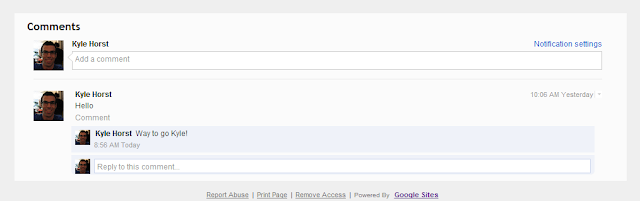
Guess what? You can now see the faces of those who are commenting on your Google Site. But let's be honest, how many of you are actually using the comments system in Google Sites? I haven't stressed this feature to my clients but perhaps now I'm a bit more proud of the commenting system at the footer of Google Sites pages. What's new? You get portraits, a better looking design, and notification settings. Tip: If you don't want the comments feature at the bottom of a specific page, go to More > Page Settings > Disable Comments. Conclusion This is a small feature upgrade, but perhaps it will allude to the much more demanded public commenting system people have been clamoring for. I mean, add public comments to your announcements so that it acts more like a blog. It's been difficult to integrate Disqus to Google Sites (can be done but looks pretty clunky). In the meantime, this is nice for those who are already using the editor/owner comments ...

Favorite Free Font - Sahara

Image
I love typography, especially when it is free. In honor of this gem I found from UpperType , here's a fun graphic. Also, just for your information, the sub font used is Sansita One.

Google Sites Survey Available

Image
It seems like these surveys crop up every other month or so. Since Google Sites received a recent update with the new "Edit Site Layout" option in the More button, they must be listening to the community of Google Sites users. That update was more of a convenience than anything, not a new feature, but I use it all the time now, especially on adding links to my Horizontal Navigation. Anyways, please take your time to fill out the Google Sites survey the best you can. This feedback will undoubtedly point the Google Docs team to implement most wanted features. How would you describe Google Sites in one word? Most often I choose words like: efficient, easy, versatile. Tell me what you think and stay tuned for more Google Sites news.

New Feature - Quick Site Layout

Image
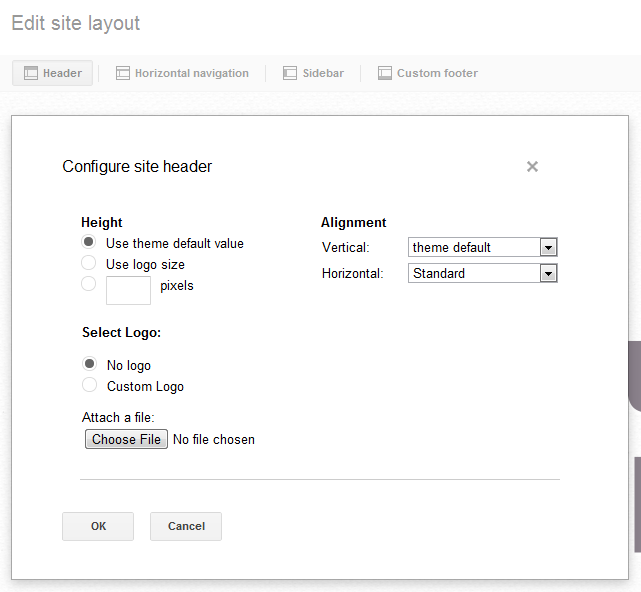
INTRO There is now a quick and easy way to edit Site Layout. For those new to Google Sites, the old way of things (which will be retired in due time) was to go to More > Manage Site > Site Layout. Then you would have to make changes, save, and see how those changes affected your website. Here's what's new: Under More you will see "Edit Site Layout   New! " Site Layout can now be interactively changed. Options are available: Header, Horizontal Nav, Sidebar, Footer. IMAGES Header options are available when you select header area. Even the Header background image. Very nice. It's been a while since I saw New! used in connection with Google Sites. Little edit and add buttons allow you to make a lot of changes on the fly. CONCLUSION Google Sites is receiving more of the attention it deserves. As my Google Sites designing and consulting business, Kirksville Web Design, I continue to see how company's are using Sites. ...

Resell Google Sites

Image
As you all probably know I work for Kirksville Web Design as Lead Designer. We've proudly partnered with many Google Apps Resellers who then in turn market and resell our services. What do you mean "Resell"? Kirksville Web Design creates custom Google Sites websites. We usually provide fixed firm price quotes to our clients. However, if you find a client for us, we can provide you  the price quote and then you can add your own profit margin (for example 10%). Give me an example Let's say you're an IT guy, you sell computers and do networking. You aren't a graphic designer, but you know a lawyer who needs a new website, either it looks horrendous or he doesn't have one at all. Offer to create a website for him using this awesome web designer you know (that's us!). Email us and tell us about your lawyer friend. We'll send to a survey to share with the lawyer friend. When he fills that out and gives it back to you then we can take a look...

How To Get Page Descriptions / Meta Tags in Google Sites Created in Apps

Image
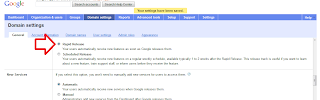
Happy Monday all! Ok, do not fret you can get meta tags in google sites created in Apps, however you may not see the page descriptions box when you click on more > page settings. If this is the case then you need to log into your apps account and make a simple chanage. Go to google.com/apps and log into your apps account in 'domin management' mode. Click on domain settings, the click the radar button readinig Rapid release. All you are doing is giving google the green light to add features rapidly as they shoot along. Now you have the box at your disposal enjoy labelling all those pesky pages won't you ... B x www.siteshelp.co.uk

Dictionary Definition - Meta Tags

Happy Friday all! To add to Kyle's great and informative post about meta tags I thought I would share with you my theory about adding  page descriptions via the "Page Settings" dialog. All you need to make note of the dictionary's description of a meta tag, otherwise you will just be dding mindless keywords which, quite frankly, will look and sound like a big fat spam sandwich. met·a·tag noun Computers .   a tag in HTML that is inserted at the top of a Web page chiefly to describe its content and provide keywords for use by search engines. So, take heed, take time and describe your pages content, but briefly. It really helps if the content of your page is original in the first place, then naturally your meta tag will be more meaningful and visible in searches. Content is king in SEO and meta tags are often used in search snippets too (aka search results text). This is a great feature and is something or...

New Page Descriptions Improve SEO for Google Sites

Image
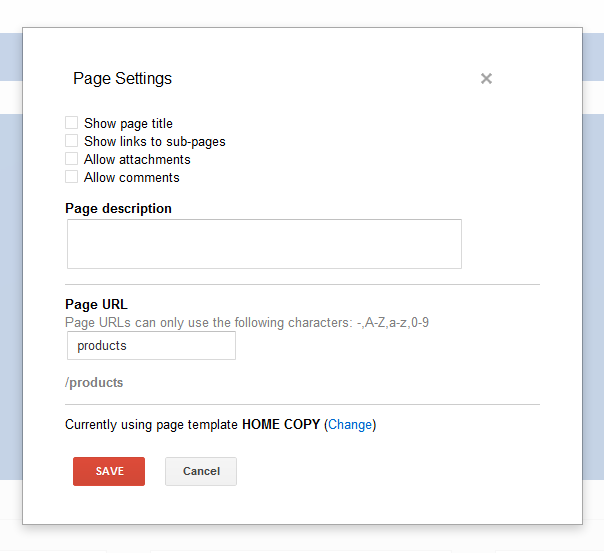
Introduction So, I was in page settings (under MORE), doing my thing - hiding links to subpages, attachments, and comments - and I saw a page description field. This is brand new! Let's look deeper on this small, but important update! Page Description - Believe it or not, that wasn't there before. I promise. Effect For most, this will have a positive impact on public facing websites SEO. Now you can specifically create the meta data for pages. Let's map out an example. You are an attorney who focuses on three different areas of practice: family law, criminal law, and estate law. The Site Description creates a blanket description for your website, so you might describe that you are a lawyer in Anytown, USA. Now let's imagine you have a page under Services called Family Law. Page title is very important, but it's good to follow that up with a good description explain that you handle Divorce and Child Custody. This page information will be factored in to ...

iGoogle's Retiring - How it affects Gadgets for Sites

Image
Summary Since iGoogle is retiring fully in 2013, the Google Gadget editor will be effected. Referred to as the Google Gadget Gallery in Google Sites, this gallery of published gadgets will go away. The functionality of xml gadgets will be constant though, so prepare your websites. Quoted from Google: As we announced on the Official Google Blog , on November 1, 2013, we will be retiring iGoogle. To ensure a smooth transition for your users, you may want to update your gadgets and direct users to your site or offer the ability to export user data. You may also consider launching your application on one of our other platforms . Similarly, we will stop accepting new gadgets after July 31, 2012 - but you will be able to update and maintain existing gadgets, as before. What to do Take the initiative to host your gadgets (look for the .xml file) on your own Google Site. You can upload them anywhere on your site and use the "Add Gadget by URL" feature. ...

Favorite Free Font - Ashbury Light

Image
A beautiful serif font free on MyFonts.com, but get it for free! It's always great to have a classy font in your arsenal. Just gives you the feeling that a classic font can convey modernity in the right setting. Click here to visit and download.

Google Sites and Cloudbakers (Part 2)

Why did you need/want a Google Sites consultant? What’s it been like working with Kirksville Web Design? We wanted a Google Sites consultant/partner to increase our knowledge expertise and efficiency. Kyle is 100% focused on Google Sites. Since partnering with Kyle the Great we have been able to bounce ideas off of each other and come up with creative solutions and designs for Sites. Simply put, partnering with Kirksville Web Design and working with Kyle has been awesome and beneficial for our clients. We’ve had a couple of great projects together, what were those like from your perspective? Yes we have! What always amazes me about you is the efficiency at which you work. We have actually had clients say they were happy and surprised with the amount of time it took. Your visual creativity for sites adds alot of value, it’s always important for sites to have good content, but the display is also important and contributes to the engagement of users. Our working relationship is exc...

Google Sites and Cloudbakers (Part 1)

Image
Introduction Building solid partnerships with Google Apps Resellers is an important aspect of being a freelancer, consultant, and/or the graphic designer. Just think, Google Apps Resellers are charged with providing cloud computing solutions and that alone has them involved in all sorts of supplementary services. My company, Kirksville Web Design , has had the pleasure of partnering with Google Apps Reseller, Cloudbakers , for Google Sites design and development services. For the most part, we provide the graphics and Sites know-how, while Cloudbakers consults with clients and provides Google Apps Script support. My point of contact over the past months has been Andrew Johnston. We chat all the time and so when I asked him for an interview, he was delighted. A Great Google Apps Reseller in Chicago, IL, US Andrew, tell us a bit about Cloudbakers and yourself. I am the Manager of Business Development for Cloudbakers , a Chicago-based Google Apps Premier SMB Reseller. Working ...

Launching AppsResellers.net

Image
Here at Kirksville Web Design  we are proud to announce the launch of our newest website and this one is close to our heart. =) AppsResellers.net is dedicated to easily showing people how to find a Google Apps Authorized Reseller near you. Visitors can use the handy Google Map tool to find their location and Google Apps Resellers in their area. We look forward to telling you more about the site, but for now, explore it and enjoy. www.appsresellers.net

Site Search Update & Bug

Image
UPDATE 6/5/2012 9:13am - Steps are being taken to fix the bug as I speak. The search box can now be disabled. If you had it previously disabled before the bug it will revert to that. However, there seems to be some vertical alignment issues to iron out. Horizontal navigation bars are being adversely effected. I'll keep you posted. Intro This is kind of a bug report and update in one. Overall this is a small update, but one that will be very handy for company intranets and schools. I hope to use it soon on Kirksville Web Design intranet projects. Bug Even though you may have Search disabled, it seems to be showing up. You can visit Manage Site > Site Layout > Site Search > the box will be unchecked. This may interfere with graphics that weren't made to take this into account. A small hassle, but still one that needs resolved. Update A new checkbox for search all sites in your Google Apps domain. You are no longer confined to searching within one site f...

RSS Feed with Feedburner's BuzzBoost

Image
Kyle here from Kirksville Web Design . For some reason the Embed RSS Feed featured gadget is broken and we all needed a solution to embedding an RSS feed into our Google Sites. You needed it, we made it. Using Feedburner, a service of Google, you can use this handy XML gadget I created to add a nice looking feed. Simply go through the steps of adding your syndication to Feedburner and click on the "Publicize tab." From there, you'll see BuzzBoost - Republish your RSS Feed as HTML! Activate this service and customize your options. You'll see a code for adding this to your Google Sites webpage. Copy this string of code, your Javascript URL for the feed. (See the highlighted part in the screenshot below. Copy that code and get ready to use it! "But Google Sites doesn't support Javascript" you may say. Google Sites supports Javascript in the confines of a gadget. So, here's your gadget. Styled and everything, located at: https://si...

Scheduled Google Hangout

Image
Join me for a Google + Hangout today at 11am PST all about Google Apps. Here's a link to my profile: https://plus.google.com/u/0/111511601440949402611

Go Google Sites with Kirksville Web Design

Image
In honor of gogooglesites.kirksvillewebdesign.com going live earlier today, here is a free rendering of the Google Sites icon. Promote Google Sites with this nice icon. Visit the new website Let's take a look at the new site! Make it easy for people to share your website.  Use the +1 button in Insert... and the Tweet button from Insert > More Gadgets... > Featured What's that ??? Create the visual tension to learn more What's that icon? I've gone Google, what's his point? Encourage the visitor to scroll down.

Survey Available Now

Google Sites is taking user feedback via a survey right now. If you are logged into a Google Site you will see it in the tool bar next to edit page, create page, and more. I've seen it both on standard Google accounts and Google Apps for Business accounts. Take your time and let the Google Docs, that is the Sites team as well, let them know your thoughts. Thanks. It's always great to see Google Sites steered in a good direction from user input.