Posts

gCon - The Google Apps for Work Event

Image
Date : 9/22 - 9/25 The Gooru , the number one resource site for Google Apps, announced gCON , an online event giving Google Apps administrators and end users the information they need to make day to day tasks in Google Apps easier. Held over four days exclusively through Hangouts on Air, gCON will bring together experienced IT professionals, power users and third-party experts for in-depth training covering a range of topics from optimizing Google Drive to getting the most out of Gmail. The Gooru is partnering with leading third-party solution providers in the ecosystem including FlashPanel , Esna , AODocs , Virtru , Spanning , Insightly , Smartsheet and Zendesk to bring gCON to Google Apps users around the world. gCON attendees will receive a free gCON t-shirt, a chance to become gCON Certified for Google Apps and will be registered to win giveaways including Nexus 5, Moto 360, Bose Headphones, Samsung Chromebook 2 and more. For more information and to register for training sessio...

New Hangout Buttons on Google Sites

Image
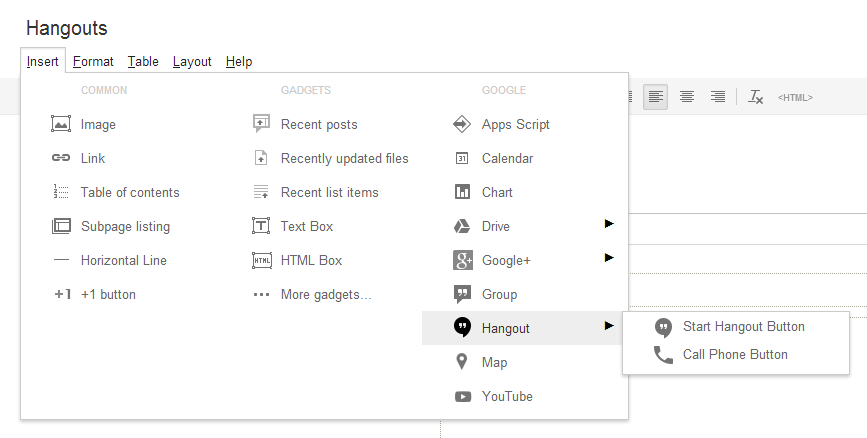
How it works For the Hangout Web Conference there are two fields: Emails Profile IDs Email: Self-explanatory, your Google Email account. Profile ID: Check your Google + URL. Mine is KyleHorst, because my Profile on Google Plus URL is https://plus.google.com/+KyleHorst .  The + symbol is not needed in the field. For the Phone Call Button Just your phone number, no spaces, dashes, parentheses, etc. Have fun with this new Google Sites update! Love it!

New Google Sites - Analytics, Responsive Menu, Headings and more

Intro I'm still testing out these Google Sites updates. However, in the interest of keeping you all informed on the current build of Google Sites, I am posting the updates for you now. Improved accessibility, editing and ease of use in Google Sites Several accessibility improvements have been made to Google Sites, ranging from new keyboard shortcuts for editors (like Alt+Shift+F for opening the editor toolbar) to better viewing experiences for readers. Editors can now also set image width to 100% of the screen width and easily customize the font, color, and size of lower-level headers (H2, H3, and H4 tags).* Source: http://googleappsupdates.blogspot.com/2014/06/improved-accessibility-editing-and-ease.html Enhanced integration between Google Sites and other products Today we launched several features aimed at improving integration between Google Sites and other products. When sharing on social media sites, Google Sites now will showcase images in posts. You’ll see this cha...

Google Sites Viewer Comments System

Image
Introduction Google Sites commenting has been a nice feature since it started using a Google Plus type format. The commenting feature, however, was restricted to Google Site owners and editors. It was a feature for viewers to use and for more general comments to be given. This, in effect, made it an awkward feature since the purpose was muddled. Anyways, people developed work arounds using Disqus and other Google Apps Script solutions. Now, let me introduce new and improved viewer commenting capability. Please note, viewer commenting does not mean public  commenting. It is still the case the you cannot enable commenting for the random visitor to leave a comment on your page (leave that to your blog). Please note, this feature is only available for Google Apps customers. Enabling Viewer Commenting As a Google Apps administrator, you can allow authenticated viewers in your domain to comment on your Google Apps Sites to make your sites more social. Viewer commenting is ...

Google Gooru Admin Training Week

Image
I wanted to make sure I personally invited you to this round of Admin Training Week. I also wanted to let you know that this Admin Training Week will be very different than the last one: 9 presentations (3 more than last time) All new topics (no overlap from last time) Roundtable discussion with real Google Apps Admins Of course, there will still be some awesome freebies like last time (free t-shirt, eBook, sponsor offers), along with 9 different drawings for a Nexus 7! So, if you have time in your calendar on the 17th, 18th and 19th, it would be great to have you again for the next Admin Training Week. Register Here Hope to see you there!

Google Sites Security Update

Image
The Security Issue It was not possible to secure your content by not allowing your entire site or webpages to be iframed. Anyone could iframe your site since you had no protection against it. The Update You can prevent others from iframing your Google Site. See the provision below: The Result If someone tries to iframe your site into another Google Site or elsewhere, it will just be a blank iframe. For some of us, this resulted in our iframed content going missing. Just check the box in Manage Site options to reenable for iframed content.

Sites Admin Training with Google Gooru - 4/24/2014

Image
Google Gooru Admin Training Week Please join us Tuesday, Wednesday and Thursday this week for our very first Google Gooru Admin Training Week! We'll be joined by several leading experts in the Google Apps community who will cover everything there is to know about managing Google Apps Register Here ---> Google Gooru's Admin Training Week Every session will be held via Hangout on Air, so anyone is welcome to attend. You can register for each event below...see you tomorrow! April 22nd - Admin Console and Apps Script April 23rd - Google Drive and FlashPanel April 24th - Google Sites and Mobile Device Management  with  +Kyle Horst

85 Excellent Reviews for Google Sites Design Service

Image
We reached a new goal in the Google Apps Marketplace as +Kirksville Web Design  . We are the most reviewed, highly rated Google Sites designer on the entire Marketplace. As our title mentions, we have 85 positive reviews for our design services using just Google Sites. Here are our three most recent reviews from April, 2014: Will Use Again  by Ismael Amado with Flagship Inc. April 09, 2014 Kirksville Web Design was able to help us realize our goal of using google sites as a replacement for our aging sharepoint system. The designs were clean, elegant, and easy to use. Will not hesitate to engage Kyle and his team again if/when the need arises. Great Experience  by Dane Deutsch with DCS Netlink April 08, 2014 Very satisfied with our experience with Kirksville Web Design! Great service, and outstanding ability to understand the customer needs, from the planning to the design and content aspects of their web page. Kyle is a team player who works in a very relaxed and conf...

New Google Sites Updates - More Button & Pop-up

Image
More Button Just a simple change of user experience. The More Button, as we all called it, is now a more commonly seen gear or cog icon. Therefore it gives the impression of Global Settings. Pop-up Disclaimer You've probably seen this initial website load-up shadow boxes. Well now Google Sites has one. Right now it is text only and is optional. There you go, just two quick updates that I've seen come through. Is this a weekly thing now? Thanks Google Sites team.

Google Sites Updates - New Organization, SEO & Social Features

Image
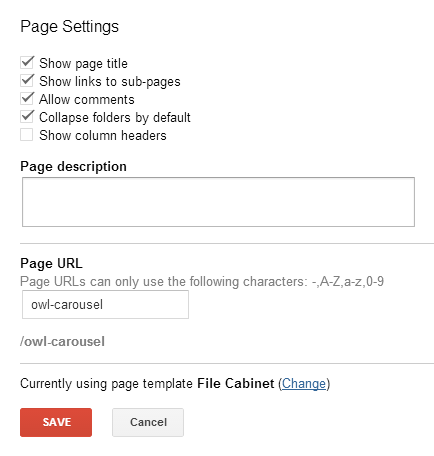
Intro We love to see Google Sites updates come along, don't we? I am happy to report of three updates to Google Sites: File Cabinet Sorting & Collapse Folders Ability Canonical Web Addresses Embed a Google Plus post These have each rolled out individually over the past month or two (sorry for not updating you sooner!) Let's discuss each update, how it impacts Google Sites and why you should care. File Cabinet Sorting & Collapse Folders Ability This feature is the newest and can be useful for those of you still using the File Cabinet page template, as opposed to embedding multiple Google Drive Folders. Essentially here's what you do: Go to More Page Settings There you will see: Collapse folders by default Show column headers This is only available on File Cabinet type pages. To setup as a File Cabinet (webpage template is the default). Do this: More Change Page Template Choose File Cabinet This is a nice feature, but I question as to t...

Google Sites Partnership: Appirio & Kirksville Web Design

Image
Interviewer: +Kyle Horst , Owner, Kirksville Web Design Interviewee: +David Spangler , Google Apps Solutions Architect, Appirio How is Appirio offering Google Sites? Appirio has partnered with Kirksville Web Design for a number of Google Sites projects, ranging from Corporate Intranet design to POC (Proof of Concept) demo sites. In addition, we’ve been working on solutions to assist customers with moving away from heavy, premised-based intranet systems (like SharePoint) by leveraging the Google Enterprise suite focused on a combination of Google Sites and Google Drive capabilities. The designers at Kirksville Web Design are able to deliver an exciting product that fits within the frameworks of Google Sites. Can you describe some of your Sites projects? What were the results? In our work with a large, multi-national pharmaceutical organization, we partnered with Kirksville to provide a revamp of their Google Apps launch site. The site was a rebuild/rethink away from their le...

Talk to the Google Sites Team

Image
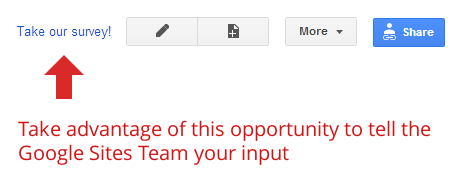
Hello Everyone. This is just a quick reminder of the importance of user feedback and input on surveys. If you have a suggestion, concern or gripe with Google Sites, the "Take our survey!" option is the best way you've got to do so. It's your way to talk to the Google Sites team. Therefore, please take the survey. Suggest something amazing like adding a tagging system to Google Sites, more usable themes or viewer commenting / login function. I'm not sure if this link will work for long or for everyone, but here's a shot: https://survey.googleratings.com/wix/p3925964.aspx Click on this image to take a survey now. Thanks!

New Google Sites Update - Copy Page, Open Nav Link in New Tab

Image
Hello Everybody!  +Kyle Horst  here with a great new set of updates to Google Sites. 2014 won't be the year Sites is left in the lurch. So let's cover these two new features. 1. Copy Page Creating a Page Template using the "Save as Page Template" feature was alright, but Copy Page makes the process that much easier and less of an investment. Copying a page is right in the More dropdown menu next to Move Page and Print Page. 2. Open Navigation Link in a New Window The navigation gadget received an upgrade with the new "open this link in a new window" checkbox option. It is part of the Add URL (not add page) option in the configure navigation windows. This is great for opening external website in a new tab or window, since you don't always want visitor to navigate away from your site. Great for intranet usage! That wraps this episode up of Google Sites' new features. Let me know if I missed anything of course. Thanks!

Google Sites Case Study - America's Best Cleaners Intranet

Image
Interview with Chris White, Executive Director at America’s Best Cleaners by Kyle Horst, Kirksville Web Design Tell us a bit about America’s Best Cleaners and its Going Google. America’s Best Cleaners is a nationally recognized independent certification mark for the drycleaning industry. Affiliates are certified on an annual basis and once certified work together to share the best business practices in the industry. Our affiliates make up the best of the best in the industry and represent over 92 million dollars in gross revenue. The affiliation is spread throughout the United States with several international affiliates and industry experts sharing information and in depth discussions. With over 60 individual users at any one time and constantly growing we needed a platform that was universally accepted and easy to implement to share sensitive business data, discussions, images and all other forms of collaboration outlets with our affiliates How is America’s Best C...

Thanks for a Great Year!

Image
2013 was a tremendous success for us here at Kirksville Web Design and we want to talk everyone who supported our little design firm. It's a new year and we're thinking hard on how to bring the next wave of innovation to Google Sites and our graphic design. Here are some sites we've launched recently. Please take a look: ACE CONSULTING www.consultace.biz A financial women-owned consulting business ARPDEFENDER www.arpdefender.com A website for secure local area networks company. ZEUSGARD www.zeusgard.com Secure internet browsing products & software DEPOT LOFTS www.depot-lofts.com Website for new apartments in Boise, Idaho DOTTRIO www.dottrio.com A small business home inspection, appraisal and contracting site NATIONS HOME REMODELERS  www.nationshomeremodelers.net Home remodeling construction company website.

Bug Report - Images Not Found

Image
UPDATE 12/31/2013 - This Bug Seems to have disappeared and no more image loading problems are occuring. Google Sites is currently experiencing an issue where images, whether background images, logos, page images, icons, etc, are not being found and result in a broken image link. At this point it is very sporadic and images may appear, reappear and be generally glitchy. It has been reported to Top Contributors on the Google Sites Help Forum and consequently has been escalated to Google Sites team representatives. Ya, it's a problem.

Google Sites Update: Logo now Maps to Custom Domain

Image
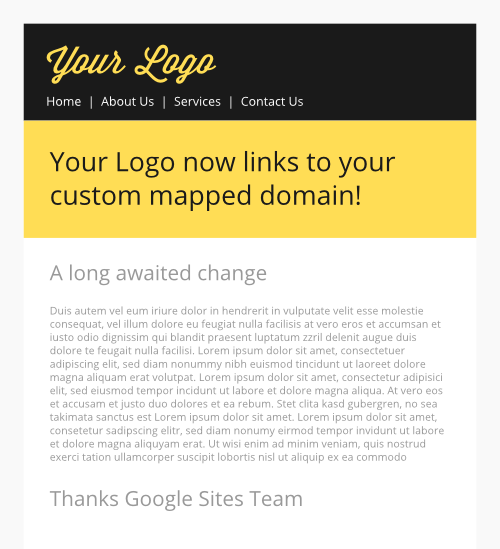
The Old Problem Imagine you had a Google Sites mapped to a custom domain, like www.kirksvillewebdesign.com. If you used Google Sites custom logo upload into the header, it would always link to your long sites.google.com/a/domainname.com/sitetitle URL. A total bummer! The Update & Solution If you Google Sites is mapped and someone clicks on your header logo, you simply go back to the base custom domain URL! No more confusion about your Site's location. And this will help search engines be less confused now with the dread duplicate content. Original Issue Log:  https://code.google.com/p/google-sites-issues/issues/detail?id=63#makechanges What's this prove?  Google still supports Google Sites, albeit delayed. Fun Commemoration Graphic

Google Sites Case Study: Teach for America

Image
Guest: Crystal Tang, Director of Solutions - Information Technology at  Teach For America Interviewer: Kyle Horst, Kirksville Web Design Crystal, tell us a bit about Teach For America and Going Google Currently, we have over 2000 full-time staff members at Teach For America who are working to ensure that all children, regardless of their backgrounds, have excellent educational opportunities. Our staff members are located across the country, and because teammates are not always co-located, our IT team aims to ensure that all our staff members have the tools they need to do their jobs well and to do their work efficiently. Google Apps has allowed our staff members to easily collaborate and share information with each other and with the corps members we support , in turn allowing us to multiply our impact. Locations of Teach For America across the country How is Teach For America using Google Sites? Google Sites has become a staple within Teach For America’s wor...

Sites Update: Add Drive Files, Upload Multiple Images

Image
Just a quick update for you all. Google Sites' file cabinet now has the new option to upload/link to Google Drive in a one-click method. (See Screenshot Below) Also, instead of the one-by-one uploading of photos and images through Insert > Image, now you can control or shift select multiple images to upload. Definitely a mini-time saver.

Update! New Google Sites Background Options

Image
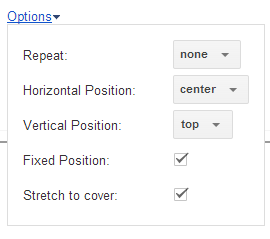
Intro Google Sites has been lacking some major features in the background department for many years. There are two background images that you can utilize: Background Image and Wrapper Image. Wrapper Image have a higher z value than Background Image, meaning it can be superimposed (be on top of) Background Image. That's where most of the fun was for using background images in Google Sites. You could have a header (wrapper image) sitting on top of a general pattern or photo (background image). The Google Sites team has added something new into the mix! Fix and Stretch those backgrounds. Fixed Backgrounds What is meant by a Fixed position background? You may have seen these for years, typically on Blogger blogs. Basically the image is stuck to the background so that no matter how much you scroll, it is seemingly fixed. Here's an example of this effect:  http://elefant-art.com/ Stretched Backgrounds Called "Stretch to cover" this option will ensure tha...

5 Reasons to Use Google Sites for Your Next Intranet

Image
Introduction Hello everybody.  +Kyle Horst  with  +Kirksville Web Design  and I wanted to come to you with this article because Google Sites is really picking up steam as a great choice for company intranets. We've been designing them like crazy. Let me present to you with five reasons why Google Sites is designed for excellent intranets. 1. Highly Customizable If you've ever seen a Sharepoint based intranet you know how ugly an intranet can be. We aren't living in the 1995 era web-o-sphere so your company intranet shouldn't look like that either. Google Sites is excellent for customization since designers have access to all branding options for the modern day company: colors, webfonts, logos & backgrounds. We've designed hundreds of intranet sites in the past couple years and it is a blast to translate the company image into a fun, inviting intranet. 2. Fully Connected All the Google products are at your disposal and several embeds are just a click...

Google Drive Folder Update & New Intranet Template

Image
Google Drive Folder View Sometimes the little subtle, hard-to-find updates make a difference. While the Google Drive folder embed is still relatively new, I have seen it widely used in internal sharing sites. That popularity has tipped the Google Sites team to make this feature even more worthwhile. There are now 2 views available for the Google Drive Folder embed 1) List View 2) Grid View. By way of review, remember that the Google Folder feature is in Edit Page Mode > Insert > Folder. The List View is what we are used to. However, even it has changed a bit. Please see the following two screenshots to get an idea of what I mean. The List View used to be more compact and only had room for a description. The New List View is more spacious and shows the When and Who last modified the Doc. List or Grid View, which will you choose? Grid View - Big Thumbnail Images Grid view, seen just above, is a more direct way of viewing what is actually inside of docum...