Posts

Web Designer Font Favorite - Mangosteen

Image
Mangosteen A serif font from Dafont.com , Download Mangosteen Sort of gives you the feel of the classic Copperplate Gothic, but provides a higher, thinner rendition. A beautiful free font that can stand on it own typographically. This is a nice gem of a font - take a look on how we used it below. A nice final product using Mangosteen from Dafont.com Here is How We Made this Graphic It's not hard to make this graphic look pretty cool. We picked a vibrant orange, #ff6600, being mangosteen and all.  We didn't kern this font at all, it is nicely uniformly spaced. Duplicated the main text. Converted the Object to a Path (this transforms it into a vector image rather than a text object) Changed to #fff white. Dynamic Offset allows you to grow the text image. Duplicated the main text and changed color to #000, black and toggled opacity to 8.8% almost transparent really. Clicked twice on the now gray text to slant the text left to right and maneuvered t...

New Update - Admin Settings for Sites

Image
Summary This small but important update provides Google Apps administrators more control on the creation and visibility of Google Sites made within the Google Apps account. So, no, this won't have an effect on regular Google accounts Sites. Users either can or cannot make Sites (that includes admins). Sites are either defaulted accessible within the organization or private. More Admin Control means More Options - Check Google Apps Settings for Google Sites Uses of Site Visibility Default Option For users with sensitive information, making Google Sites private by default can be a relief. That way your information is private until you share it. Uses of Site Creation Option Administrators can create a company intranet Google Site and disable the ability to create more Google Sites. The change in creating Google Sites will not delete previously made websites or the right to access them. Therefore all information can be consolidated onto one Google Site. Google Site...

Bug Report: Mobile Devices and JPG Rendering

Image
I had a client come to me with a problem, which rarely happens. I make it a business policy to fix technical mistakes at no charge. Technical difficulties reflect badly on both the web design and the client, so I try to resolve them as quickly as possible. The Bug Some mobile devices, notably iOS devices, will scale the wrapper background image if it is in the file format .JPG .JPEG The Effect I was quite perplexed with this problem, so I do what all the best engineers do - troubleshoot. As you can see the teal banner that created a wonderful backdrop for my horizontal navigation bar, was shoved up and scaled down. Look for similar effect to your wrapper background image. This ruined the navigation for mobile visitors to this website. The text was virtually invisible against the brown noisy background. The Horizontal Navigation Bar is missed - ack! iPhone users will hate me and iPad users too. The Solution Change your Wrapper Background Image from a JPG / JPEG into a .PN...

Set Up Email Notifications When Your Google Docs Form is Submitted or Filled Out

Howdy! Beckystar here again .... Google docs forms work hand in hand with google sites and are a favourite to user wanting to contact you, forms are quick and simple to fill out but what about the replies? So, here is how to find out virtually straight away when people fill out and hit submit on one of your google doc forms! Once you have created your form close the window by hitting the big red cross! Open the spread sheet which contains your once filled out forms data > choose share > set notification rules > select "A user submits a form" option and how often you want to know, straight away or a daily digest. Remember to save your changes!

Revert Back To The Old Google Sites User Interface

Image
Hello! Beckystar from Web Princess fame here .... long time not blog! If you are not getting on with the new user interface that google sites introduced recently you can revert back to the classic style So here is how to disable the new user interface. Ok > go to sites.google.com (or go to your google site) and log in with your google account > click on the 'user settings' link which is located under the cog like settings icon in the top right of your browser's page. Uncheck the box beside 'use the new look' Remember to save your changes then you are done!

Document Hosting With Google Products - Google for Non-Profits Blog

Document Hosting With Google Products - Google for Non-Profits Blog

Google Sites Hangout with KWD

UPDATE: I would like to thank all who joined this successful Google + Hangout. I plan to report our topics of discussion in a subsequent post. Join Kirksville Web Design right now for a Google + Hangout. https://plus.google.com/hangouts/extras/talk.google.com/google%2520sites%2520hangout?authuser=0&hl=en

Bug Report: Check Your Websites

Image
Issue: Scrollbars are Popping Up Everywhere If you have created an image that extends beyond the width of your content, on all browsers a scrollbar will now appear. See below: Ugly Ugly, Get Rid of It Now I made all my images width set to 30 pixels minus the Site Width set in Manage Site > Site Layout. Most of my pages are 940 pixels wide, so I had images set to 910 pixels. Through some update to Google Sites this causes a scrollbar to appear. Solution: The most efficient solution, rather than change the width of your images in the HTML, is to change your Site Width. Now all my images must be 32 pixels minus the Site Width in order to avoid the scrollbar. Alternative is the edit HTML, and in the <img src="..."> add width=" [## SITE WIDTH - 32 PIXELS] px" Conclusion: Unannounced updates and unforeseen bugs from the Google Sites team really throw me for a loop. I'll try to keep all up to date with any Google Sites bugs that come our...

How Much Should a Google Sites Website Cost?

Image
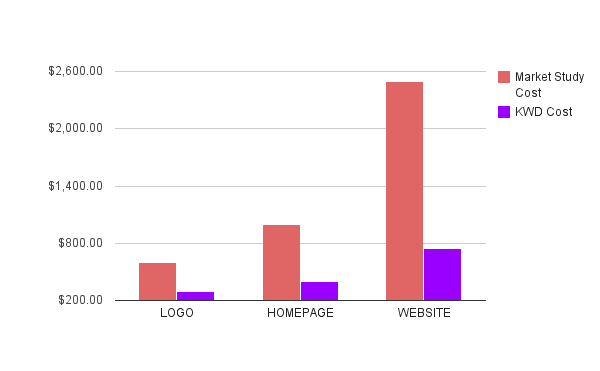
When a field such as Google Sites web design is brand new it is difficult for clients, designers, and other interested parties to approach the cost. After all, Google Sites is free and the hosting is free. So what are you paying for with a Google Sites website? How much is it really worth? Pricing in the General Web Design Market Take a look at the conclusions illustrated in this chart from the study contained at  http://blog.folyo.me/post/10723370923/how-much-does-a-website-cost   KWD - Kirksville Web Design doesn't charge you nearly the going rate. Should the cost of a Google Site be as high as a typical website? No, not really. There is a lot less work that must be done to a Google Sites website because it is more efficient for the designer. I can't speak for all Google Sites designers but here are the factors that dictate our cost. Factors for Cost Graphic Design Time Consultation and Training Time Coding of Gadgets, HTML, and Scripts Time Domain Name S...

Google + Hangout with Kirksville Web Design

Image
UPDATE: Thanks for all that came to the hangout. My next scheduled Google + Hangout will be 10/12/2011 at 4:30pm Eastern US (EST). Hi folks, Kyle Horst of Kirksville Web Design here, I am hanging out on Google + right now for the next 2 hours. Join up: https://plus.google.com/hangouts/extras/talk.google.com/just%2520hanging I'll try to actually schedule this next time. =) Until Next Time!

Freebie: 'Pixelated Seamless Tile Background'

Image
Backgrounds and textures are increasingly important in contemporary web design. It can be hard to find suitable patterns for web design, I know, I've looked. It seems like everyone uses Adobe filetypes. Well here is a GIMP pattern (.pat) for free. See how I've used it below and then download it for yourself. Create a high-tech look with this tile background. Not the crazy parallelograms, the gray part. Use it for your background image in Google Sites for a fast-loading interesting background. Try it as a table background . Remember edit html, background=" image url here " in either <table> or <td> Download the .png file using 'Pay with a Tweet.' What is 'Pay with a Tweet'? A great little innovative marketing tool I found. www.paywithatweet.com How can I convert this to use as GIMP pattern? Open the .png file in GIMP > Save as... > Find your GIMP Folder (usually under your user) >save as a .pat > refresh your...

Google Sites Grows in Popularity

The proof is in the pudding as they say. Google Sites has taken the spot of  Google Reader on the Google toolbar common across its applications. One Google employee commented: I wanted to give you more information on the changes to the links at the top of Gmail. Google is always working to improve our products, and that often results in changes such as the one you are seeing. While the link to Reader has moved, you can continue to access Google Reader under the "More" dropdown. Or, you can also set a specific bookmark to reader.google.com for one-click access. Depending your browser, try dragging http://reader.google.com right from this post onto the bookmark bar on your browser (usually below the URL bar). I've attached some additional information on bookmarks below. In the meantime, I've shared your feedback with the rest of the team. Thanks to googlesystems.blogspot.com for sharing this unofficial change and also noting the trend toward Google Sites. Check...

Interview with Stephen Hind of Steegle.com

Stephen Hind is the creator/writer of Steegle.com , an excellent crossroads of everything Google Sites related. Stephen is a Top Contributor on the Google Sites help forums and a well-known Google Sites guru. Interviewer: Kyle Horst of Kirksville Web Design Tell us about yourself. I’m an IT Manager for a training company in the UK. My history of using and developing for the web started when I used to own my own company and a customer wanted me to make some web pages, so I learned how to. I moved on from there to work for the National Health Service in the UK, developing and maintaining websites for them. At the NHS I learned a great deal about PHP, MySQL but most importantly accessibility and usability. From there I moved to RWP Training where I was employed to look after their IT infrastructure and develop some web-based projects and re-develop the website. What’s your favorite food?! =) See my profile! ;-) (Kyle looks it up) Spaghetti Carbonara, let’s face it - you love bacon an...

Google Sites User Survey Available

Image
New Google Sites User Survey available. Go ahead, take it. Here is a direct link: https://survey.googleratings.com/wix/p3925964.aspx?V1=ND&ke=1&l=9 Feedback has done great things for Google Sites, like page-permissions. Take a moment. What did I write about? Column Widths - The sidebar page templates are often too small. This would allow for more interesting layouts. Premium Templates - let designers like myself sell our work, like wordpress. Dedicated Footer Background - with ability to span browser width. Horizontal Navigation Padding Toggle - I want to be able to bring an image flush to the navigation bar. Better Gadgets Community - a better database, organization, top / popular / high-rated gadgets. Unappealing is the gadget system, which is lack luster compared to Wordpress or other competitors. Finding solid plugins is a frustration. Background Image Rendering - If you use background image as a header background it doesn't properly render...

News - Google Sites Accessibility

Summary: Google Sites has the ability to speak actions that are taken place for the benefit of the blind. Also, hotkeys are promoted within Google Sites. Significance: Accessibility for people of all sorts is a good thing. Google Sites is that much more viable to companies who strive to provide fair opportunity to all their employees. As for hotkeys, I wouldn't emphasize that significance too much as I don't use them. However, if I want to turn Google Sites into a real-time strategy game, I'm all set! Article: Today we announced some of the updates we’ve released recently to make Google’s applications more accessible to the blind community. For Google Docs and Sites, we’re pleased to announce new keyboard shortcuts and better screen reader support for our blind users. Screen reader support in Google Docs and Sites To help blind users read, edit and navigate content, Google Docs (including documents list, documents and spreadsheets) and Sites now support two screen readers ...

New Feature - Customise Your Google Sites SYSTEM Footer Links

Image
Howdy Google Siters, Google have added a new feature recently which allows you to hide 'Sign In, Recent Changes or the Print Page' links from the automated Google Sites System Footer. Just log into your site > More Actions > Site Layout > Customise System Footer Links > decide which links to hide (unfortunately you can not remove them all just the ones I mentioned earlier but it's a start!) > click ok > click save changes Let me know if you have any problems. For More Articles Visit My Site www.webprincess.co.uk/ Beckystar aka Web Princess

Insert A Webpage, Group or Forum In Your Google Site!

Image
There seems to be a lot of people wanting another web page incorporated into their google site. Here is a perfect and simple solution .... 1) Create your group/forum or find an interesting website and then insert it as a web page in your google site. Here is how to insert the page: 2) Click edit page > insert > more gadgets > search "Iframe Wrapper" > select > paste in the URL customise the display (uncheck display title, uncheck add border) 3) Click on ok and don't forget to save. And you are done! Check out the result!

Working With Templates - having a problem with a public Google Sites template and you can't locate that pesky rogue logo?

Image
Change Your Sites Logo - are you having a problem with a public template and you can't locate that pesky rogue logo?  ok..... there are possibly a few ways the logo or image could be attached to the top of the page click on more actions > manage site > colours and fonts > scroll down and click on Site header background image and see if that is where the logo is if the logo is not there ..... click on more actions > manage site > site layout > change logo and see if it is there ...... And last but not least, the template logo could be part of the background image. If this is the case you will need to click on view, save the image to your pc and then edit the image by placing your logo over the top for example in a program such as photoshop. Let me know if this sorts out the situation for you..... B x

Chat To Clients While They Browse Your Website - It Doesn't Get Much Better Than That!

Image
Wouldn't it be great for potential new clients to be able to contact you immediately if you are online the same time as them? Get a skype button, they can easily be used on your google site, blog or even in your email signature to let other people contact you easily. 1) Navigate to this website: http://www.skype.com/intl/en-us/tell-a-friend/get-a-skype-button/ Enter your skype name > Select the button you would like to use. I am using a button which shows my skype status. Click in the web html code box and copy the code that has been automatically generated. Now navigate to the page on your website where you would like you skype status button to appear. Click on edit page > Insert > More gadgets > Featured > Embed gadget > Paste in your html code Customise the gadget in the following way: Untick include border around gadget > Untick display title on gadget > Change the width to 150 and the height 60 Finally, click ok, sa...

Google Sites Interface Overhaul

Image
Google Sites receives a interface update in much the same style as the other Google Apps. This interface, like the others I'm sure, will catch you off guard - your classic icons will be replaced with sleeker, gray icons (The gray trend in web design seems to keep on growing.) Here at Kirksville Web Design , we instantly could not resist hitting the "Try our new look" button and delving into a redesigned world of Google Sites. It's more contemporary in look and feel, but there's not effect on the content. If you can't seem to find how to implement the new look, go to: Gear Icon in Top Right User Settings User Interface    Use the new look What does this teach us about web design in general? It is important to keep your websites fresh. I have been bumping into too many websites from the 1990's. Reach out to these folks and tell them that they can have a contemporary website, with a contemporary interface. Incorporate the new cool tones in we...

Secret Google Sites Update - Google Plus

Image
UPDATE: 9/15/2011 This has been formally released today! Yay +1 buttons for all. UPDATE: 8/31/2011 Although the +1 gadget is no longer as accessible, there is a gadget solution. Go to: More Gadgets > Public > "Google +1 button." UPDATE: Seems the gadget has been removed, probably temporarily. Look for it soon. At Kirksville Web Design , we love Google Plus , it's all the rage. It's a facebook killer some might say. It's just plain fun to learn and share with. Now, the Google + button was a bit enigmatic as to what purpose it served at first, but now it totally makes sense when paired with the Google+ social network. So immediately, when I went to post the Google + button on my Google Sites, it didn't work out. I had to host the code elsewhere and iframe it into the Google Site. An iframe, in case you don't know is a gadget that basically is a window into another website that doesn't have to even look like a window. It's very helpful for g...

RSS Feed for Google Sites!

Image
A Reliable Gadget for Embedding your Feeds I was struggling just weeks ago trying to create a RSS feed that looked decent and accomplished what should be a simple task. This minor update caught me by surprise and I am happy to see it. I was using FeedWind to accomplish a RSS feed through an iframe, that means my html was hosted with a third-party and embedded onto the webpage via Mori79's iframe gadget (search iframe under public gadgets and it is the first one). The Slideshow Option. Not terribly useful, but nice. Anyways, no more iframes, just a customizable, easy to use Google-endorsed gadget. We at Kirksville Web Design have already fully tested out this gadget including the interesting display feature, slideshow. The slideshow only shows the title as a link and a thumbnail. It's not the most useful or aesthetically pleasing, but I'm all for options here. No Transparency Allowed on Hexcode for bg color. Here's the original post below. Enjoy! Better...