Posts

New Fonts!

Image
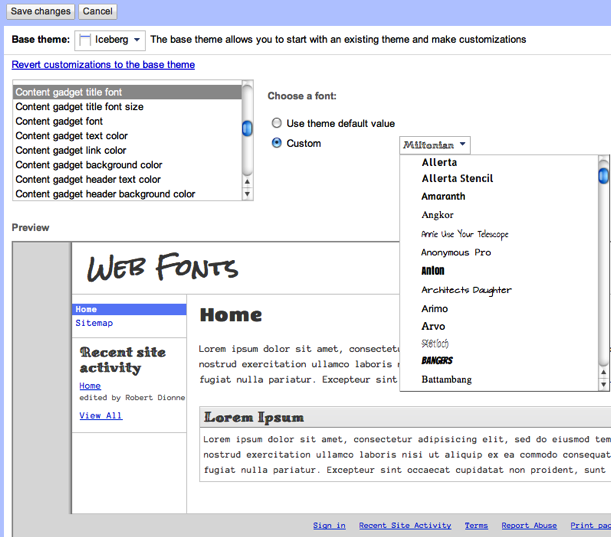
Google Sites now supports hundreds of Google Webfonts for your website. This is a wonderful change to see, though perhaps not the most requested. However, this proves that Google Sites is still on the radar of Google and that they care about customization and indeed the overall aesthetic of their product application. A big thanks to Google for translating recent Blogger changes to their Google Sites platform, enjoy the news below! Google Sites brings you over 100 new web fonts Ever wanted to make your Google site feel even more unique? Today, we added a wide variety of Google Web Fonts to Google Sites, making it easier to style your website and make it look awesome. Now you can go to Manage Site under More Actions and choose Color and Fonts in the left-hand navigation to choose fonts for the entire site in one go. The web fonts feature lets you select different sections of the site such as the entire page or just the title to selectively choose your styling. Additionally...

News - Apps Script

Image
Automate Event Management using Apps Script Tuesday, April 19, 2011 | 9:02 AM Labels: Apps Script Editor's Note: Guest author Phil Ridout is an independent consultant specialising in Knowledge Management. He is a facilitator for the Knowledge and Innovation Network (KIN) a business to business knowledge sharing network. Last year the network I help to run, KIN, decided to start using Google Sites for their shared online space called MemberSpace. This ‘MemberSpace’ is used as a repository for shared documents and information about various KIN events. I soon realised that using Google Apps Script would significantly enhance the event management process. The network facilitators organise about 30-40 events a year. For each event we need to : Create an Events page in the MemberSpace Google Site (in a standardised format) Create a Calender Event in the Network Events Calendar maintained by facilitators Announce the event on the MemberSpace news (announcements) page Allow del...

Subscribe to Site/Page Changes

Image
Google Apps Scripts is already showing some nice progress as programmers edge into Google Sites territory. Enjoy this nice tutorial from the folks at Revevol. http://sites.google.com/site/subscribetochangesforviewers/

News - Recovery of Deleted Sites

In a recent update by Google, Google Sites receives a bit more attention with a small utility for deleted sites. I never deleted a Google Site in the first place, but I bet if I wanted to get it back I'd be frantic. Scheduled Release track features update 4/12/11 Released on 4/12/2011 Google Sites: Recovery of deleted sites. If an owner of a site accidentally deletes a site, it will be immediately removed from view but they may recover it by visiting its URL within 30 days. Release track: Scheduled* Editions included: Google Apps, Google Apps for Business, Government and Education For more information: http://gmailblog.blogspot.com/2011/04/fixing-little-things.html About Calendar Labs http://googleappsupdates.blogspot.com/2011/04/accidentally-delete-site-owners-can-now.html *Scheduled Release track: Domains with ‘Enable scheduled releases’ checkbox enabled in the administrator control panel. Learn more

Go, Do This! How To - The 'Mouse Over Image Change'

Hey, Beckystar here again from web princess :) One of my favourite effects is the 'Mouse Over Image Change', like the example I have made on my home page, my web princess logo is turquoise on white, move your mouse pointer over it, now it's turquoise on black! - click here to see it. (I apologise now for the lengthy links used in my code example, no doubt yours will be the same too!) This is so easy to do . . . . Click Edit page ► Insert ► More gadgets ► Search: Code Wrapper ► Select ► embed the code below, customise it, and remember to change the width and heights to the size of the images you use. TIP - It's best to use two images roughly the same size! TIP -To get the url of your images click More Actions ► Manage Site ► Attachments ► Click View on the images you want to use ► Copy the URL from the address bar of the pop up window displaying the image ► Repeat for image 2! This is the code: <style type="text/css"> .outer {width:24...

Tip - The Small Things

Image
Even BIG professional web designers miss some basic things in Google site powered professional  website. Some of them are: Favicon:   Making a favicon and upload in Google sites is very simple. That gives you the personalised look.  That’s not very tough, right?... Go to favicon.cc and just make one favicon and upload it in Google site's attachments. (Ha ha, I know, most of them are aware of it, but even they are not doing it.). Site header/ Background/ Wrapper images:   Some plain Background images are always not necessary too BIG, like this.              You can make a header like this, instead of above.        and make it repeat horizontally.   So we can reduce the size, and web page will load faster. Logo:   It’s always nice to put a logo in separately uploaded as logo ( Site layout> Height: Use theme default (change logo...

Google Sites Survey Available!

Image
Google is now accepting surveys for Google Sites. If you log in to http://sites.google.com , in bold red font in the upper right of the browser it says " New - Take our Survey ." This survey is specifically for Google Sites and contains some wonderful response fields for feedback related to most aspects of using Google Sites, including appearance. Take the Survey - Grade Google Sites Google Sites designers, please take your time to submit this quick survey - it even contains paragraph fields for what you like and don't like about Google Sites (I wrote a lot, believe me). I suggested Javascript support, mouse-over image support, Slider/Slide Deck support, Column Width customization, and more. What will you write? What do you love/hate about Google Sites. Comments encouraged! Thanks folks.

New Template and Navigation Tip

Image
 Apple has released their Ipad 2, it is a beautiful tablet with power and intuitive design. So I spent a lot of time of Apple's website . Beautifully simple, that's how I would describe it. Something attainable with Google Sites. Many GS websites are simple too, but not so polished. The Template I made this website from scratch. Nothing, including the nice tablet graphic is stolen, merely modeled. And I do not want to get in trouble so it is a software company draft. Please visit and enjoy. Google Sites, beautifully clean design. The "tablet" graphic is custom made with inkscape. I plan on making a video tutorial for this as it is easy enough for beginners and looks quite nice. I have already used it on my homepage for Kirksville Web Design . I tried my best to create a sophisticated, not cheesy-looking, glassy navigation bar graphic.  The graphic is part of the "wrapper background," nothing special. One thing I am particular sad about is the inab...

Google Sites and Google Apps Scripts

Image
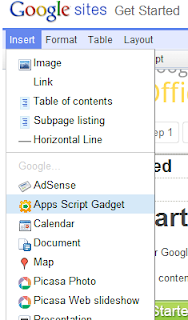
Released on 3/15/2011 More integration between Google Sites and Google Apps Scripts is now available with a new Apps Scripts gadget. This allows more complex workflows and custom applications to be built into your Google Site. Release track: Rapid* Editions included: Google Apps, Google Apps for Business, Government and Education Languages included: All languages supported by Google Sites How to access what's new: - When editing a site, select ‘Insert’ then ‘Apps Script gadget’ to add an existing script to the page. For more information: http://googleenterprise.blogspot.com/2011/03/build-applications-in-sites-using-apps.html *Rapid Release track: Domains with ‘Enable scheduled releases’ checkbox disabled in the administrator control panel. Learn more

Magic Tables! Get Lined Up And Look Pro!

Image
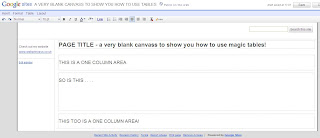
Happy Saturday Everyone! Well I have lots of memories of help needed on how to line up text and pictures and sometimes clicking on an image and selecting "wrap on" is not good enough when designing your google site. Perhaps you want to add some thumb nails of pictures with a description underneath, or,  maybe you want to create a four column look like  Perfect Square Solutions' site which will brilliantly advertise your services. To create the effect choose a one column area within your pages. Now, click on Insert > Table - then select the size you require, in this instance select two rows and four columns like this: Click in each cell columns and add text and pictures. I would recommend your pictures should be around the same size, your pictures should also be centralised. How you have them is up to you, have a play! Text looks good lined up to the left as  http://www.perfectquaresolutions.com/ h...

Gadgets for Galleries

Trying to get a good gallery in Google Sites isn't the best. But to all those who would like something cool, do a gadget search for COOLIRIS . This gadget works hand in hand with your Picasa Web Album. Adding your user name (gmail name) and the name of your album ( http://picasaweb.google.com/ (user) / (album) ) makes it real simple and easy to add. For some help on adding gadgets, be sure to check out the post Useful Gadgets to learn how to add them to your site. For an example of the Cooliris Gallery you can view my site 3sgraphics.com to see how they work. It's really neat and can add a nice flare to your portfolio or just a nice gallery! With the option to expand your gallery full screen, allow you to keep your dimensions small but still allow others to view the full image with no lost of DPI. Hope this is a good useful tips Be sure to post some of your work on our site to show case your proud work!

Tip - Discover Inkscape

Image
You have proudly developed a freeware arsenal for web design.  Your using Google Sites, GIMP , but you want to create finished graphic products.  I have experimented for the past couple weeks with Inkscape - free vector image editor. What's a vector image?  See below and you'll get a grasp of what I'm talking about. Now, I know you have a lot on your table: You've learned Google Sites, you tackled the learning curve of a photo-editing program, and now vector imaging is another big task. I would encourage you to dive right in and play around, view tutorials which are essential to building skills. I would like all Google Sites designers to be enabled to do more and do it well.  Reverse a stereo-type that we take the easy way out, remind our customers that we strive to be more creative artistically. My business, Kirksville Web Design , is getting better, because either you are growing or your deteriorating. Keep honing those skills! Check out what I made with this...

Tip - Creating a Footer

Image
Now, we can take a closer look around the footer of Google sites. I need a custom footer like this, So I created an image like this. Now I need to upload this image into Google sites. Somebody asked me about the difference between uploading as 'background image' and 'wrapper background image'. I'll show you the difference. This is the Original image: When I upload the image as 'background image, the result is: See the top. So, look at the same image uploaded as 'wrapper background image': OK. Now it clarified, right? Come to the point. We need a custom footer image like the first original image. I did upload in as a 'wrapper background image'. The result is good. Look: But, when the content is too long, or in the announcement page, it looks odd. See, This is not we want, right? So, I did two images like this: One, Another one is, Then, I upload the first image as 'wrapper background image', and the second one as ' ...

Tip - Using Social Media Buttons

Image
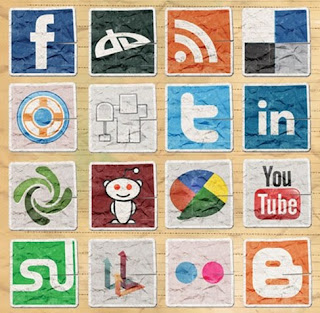
Hey, I'm Web Princess aka Beckystar and welcome to my first blog, thank you Kyle for having me! Using social media buttons to share your site or content is easy and expected by your visitors. Social buttons or icons facilitate the sharing of your site, content or blog and are now a linchpin of social media. It’s not enough to simply produce content these days. Your fans (hooray for them!) want a gizmo (I prefer gizmo to gadget) in place to allow them to share what they have read or seen with their family, friends and colleagues on Facebook, Twitter etc. Lucky for us there are some great tools out there. Next I have featured my top 3. 1. AddThis is my favourite. All you have to do is join, and it's free! However it does not work on google sites. All is not lost as good news! The amazing guys at AddThis have provided us with a google sites gadget. Go to your site, hit edit page and place your cursor where you want your social media buttons. Click on insert then more gadgets, in...

Tutorial - Creating A Mobile Site with Google Sites

Image
In a world of mobile devices, there is an easy (you can call it that) way to get your Google site to become a mobile web site. You'll have to re-design your site to fit a mobile device, which means your site will be shaved down a lot, but not so much as to steer customers away. Ok, I use Photoshop CS5 to design, so we need to start by creating a new image. Use the size of W400 H480. These sizes are your typical smart phone dimensions. The screen resolution will make your site fit correctly in the screen of the phone. Now, using your layers, create a folder or set of folders to help organize your layers. You can start to design a site the way you typically start. For this site, I am using a No header site. This way, your links will be at the very top and it will help viewers see your main pages at first glance. Your site width for the actually viewing needs to be 320px. The left over will help create the border around your site. The height doesn't matter. Here is a vie...

News - Google Engage

Image
Google announced a new service to webmasters, an important tool to acquire new clients.  That new program is called Google Engage . Use Adwords to help you and your clients I applied for this program and was accepted, meaning I had at my disposal training on Google Adwords (online advertising) and a lot of Adword's coupons to divvy out to my clients ($2,000 worth!)  Why is this cool?  Diversity of services gives a competitive advantage.  Not only can you sell your client a website, but you can help them along with selling their product or services.  It is a sort of value-addition to my proposals ($100 coupon for Adwords seems like a nice gesture). So, I applied for the program, the application was easy enough and they (Google) says they will call you, which they did.  I received a call from a nice woman who asked a couple questions and even said my Google Sites websites looked nice. Ooooo, Google badge of honor I took four 20 minute courses....

Business - Drafting and Proposals

Image
Remember quite a while ago when I posted about my small business, Kirksville Web Design?  Well, I laid low for awhile, not really searching for clients or anything.  Eventually, I received some phone calls of interested organizations.  First there was a waste management company, then someone called me on a proposal I made ages ago.  This all got me back in the mood for making websites! (Excitable, I know) I wanted to write about two important business aspects of web design: proposals and drafting.  I also want to show you my new work so you can get inspired too. Inspiration by MOblues.org Proposals In the procurement world you are providing a description of the products and services you plan to provide the client.  Make the proposal clear and concise, no need for legal contract lingo, just make it obvious. Technical assistance (service) can put the client at ease.  Also, let them know you're available to make amendments to the website (servi...

Tips - Useful Gadgets

Image
Gadgets are embeddable elements that can be tools, devices, games, or portals.  Google provides the a suite of useful gadgets related to Google Apps such as Calendar, Forms, Picasa Photos, Text Boxes, etc.  However, have you ever delved into the "more gadgets" option of your "insert" tab?  There's some great stuff, let's review. Let's Explore More Gadgets...! Google Checkout and Paypal Simple Storefront These gadgets are wonderful for implementing e-commerce on your website.  Really, there are two options with Google Checkout, there's a little button for one-item purchasing and a whole store with cart option. I have not tried out Paypal's Simple Storefront, but I can only assume they went with "simple" because it's straightforward.  Paypal is like the industry standard for online shopping, ever since E-bay, Paypal has been the pioneer of safe shopping.  Google Checkout is still rather obscure, but equally effective for cred...

News - Google Science Fair Uses Google Sites

Image
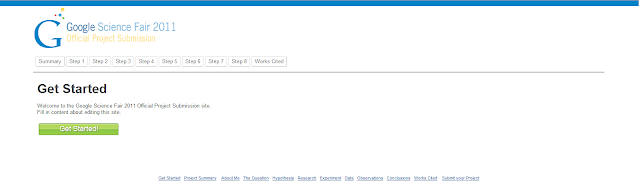
Google has its own science fair, who knew.  And that's great but, how does this relate to Google Sites?  Well, students, budding scientists, what have you, are submitting their projects via a Google Sites website...very cool.  Cool because I like when Google Sites receives exposure, it gives me that nice feeling of affirmation that just because upgrades are slow doesn't mean that Google Sites if off the radar.  This is a quote from the post, which I'll be adding the news archive: "To enter, register online and create your project as a Google Site . Registration is open through April 4, 2011. Please note: you must get parental or guardian consent in order to compete. You can check out the complete rules here . After April 4, we’ll begin judging and will announce our semi-finalists in early May." Google Sites as a vehicle for a project, this is a trend we've seen a lot, especially in the educational sphere.  I'll search "Google Sites" on twit...

Video Tutorial - Domain Setup

So you are ready to buy a domain!  You've saved up your $10 or so, and you want to make the step from obscure subdomain to your own .com. This video will show you how to use GoDaddy.com , the most popular domain registrar, to configure your domain.  It is daunting at first, and somewhat technical, but just run through the motions and you'll commit it to memory. Enjoy the video, sorry I haven't been making them as of late, the busy time of the year is over.  Please follow my blog as it raises my hopes that people like/respect the work I'm putting in to making Google Sites a more pleasant experience. Thanks to my current followers (all 9 of them) they're awesome! 

Tip - Get Inspiration Part II

Image
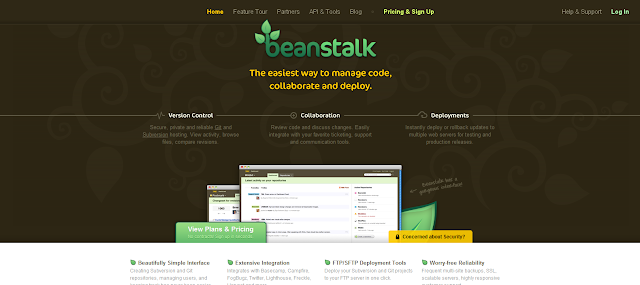
So, I thought I'd make another mock up, since that seems to be my fancy for the month.  This one was a bit more difficult.  Take a look below or click to visit beanstalkapp.com. Notice the centered horizontal navigation - that's not doable with Google Sites, only left orientation.  There's a nice color scheme here.  A three column followed by a four column format towards the bottom with little icons.  The image hugging the bottom of the brown header is a nice effect.  Let's see how I did below. Here's what I did to make it: Background and Title are together one graphic, uploaded to background wrapper, aligned top-center.  Made with GIMP of a desaturated pattern and inverted pattern over brown and toggled for opacity.  The text is the Lobster font with light gradient from top to bottom of text and a focused drop-shadow. Navigation is a unique html color hex code set in content text color and link color. Subtitle text is yellow image of te...

Tip - Get Inspiration

Image
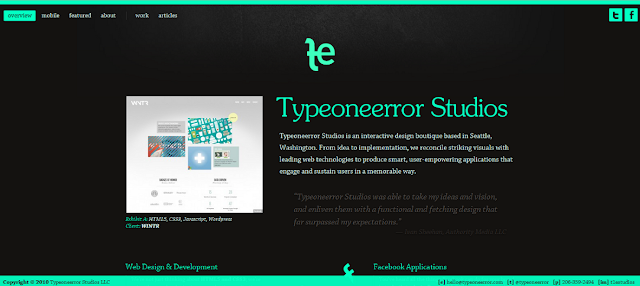
Here was my inspiration.  A website that was at the top of Webcreme.com .  I thought to myself, "I can totally make this with Google Sites!" Here is the mock up.  I used just GIMP and Google Sites.  Visit the website and use it as a Google Sites template. The power of Google Sites and decent graphics skill.  That was fun.

Tip - Create a TRUE Digital Signature

Image
If you design a website, you know about a contact page. You know to list your name, number, email, all of that right? Well, its time we start taking control over that feature, and giving our viewers and clients, and more new and creative way of relaying that informatoin. Digital Signatures A Digital Signature can contain any information you want to have, that your clients or customers will be able to scan using their phone to relay the data stored. Its the barcode that you may see on the back of a item you buy, but instead of numbers, its information! This is my personal digital signature. If scanned with a phone, it will display my name, email, phone, and website. There are many websites out there that you can create one of these items. the best thing is that you can use them on business cards, or flyers, or for information on your site. Microsoft Tag have a really nice and cool feature that you can make your digital sign. point to multiple things. The image below shows what ...

Tip - Getting Into SEO

Image
Sorry it has been awhile since my last post...this time of the year is always hectic.  Anyways, happy to quench the thirst of readers with this next topic. SEO.  If you are new to the game, it means search engine optimization, that in turn means "Why isn't my website on Google?"  There are a couple beginning tips I have for those making their websites public: Make it Public!   Make sure you Google Site is set to viewable by the public.  This is an option, More Actions > Manage Site > Share this Site > Change to Public. Buy a Domain!  This is the biggest step in SEO you take make for your website.  For just $9 - $12 a year you can own a domain, and it is not as difficult as you may think.  I recommend GoDaddy.com, but bypass all the bells and whistles, just buy the domain. Submit to Google!   I don't mean bow down to the power of Google.  If you simply type into to google "submit url to google," click on the first real webp...

News - Social Sites Help Page Rank

Google has released, as part of the their Webmaster Help Youtube channel , information that can help the Google Sites webmaster improve search engine optimization.  The new video discloses that Google now considers social sites in page rankings.  So, your efforts on Twitter, Facebook, and Google Buzz, will get you noticed by Google.  "In what capacity?" you might ask. Google Realtime is a search engine that processes all the most recent social data, while not the most visible avenue it could grow.  Backlinks are still important to Google and remember, it's their goal to properly rank what's relevant and popular.  I've provided the video below. How can I get my Google Site noticed by Google Search? It's one of the most frequent questions on the Google Sites help forum.  You want to be on the front page of a Google search entry, or at least somewhere.  Look forward to my next post on this hot topic.